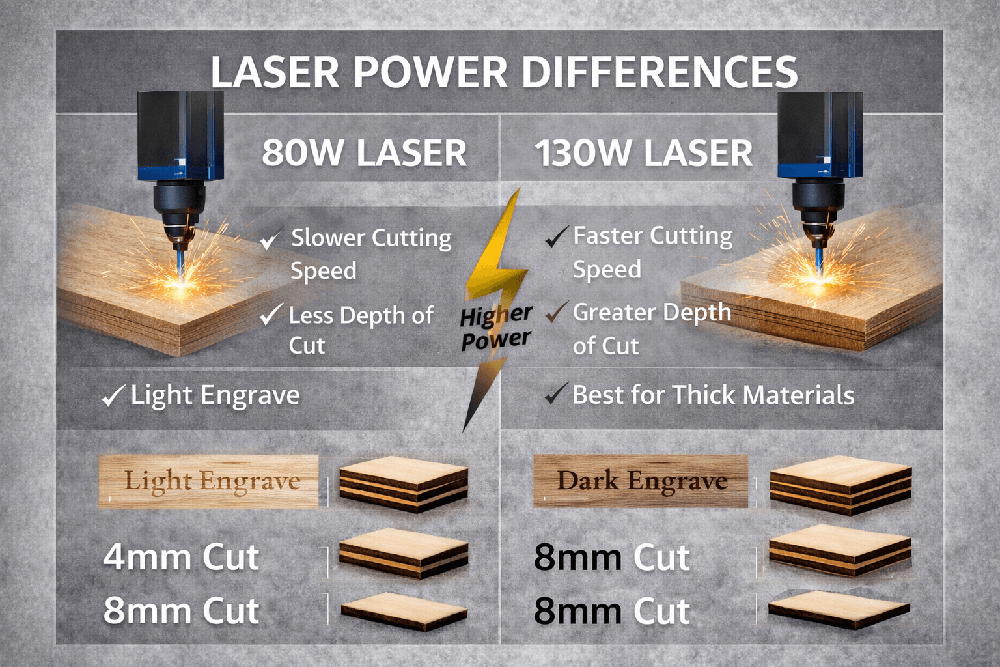
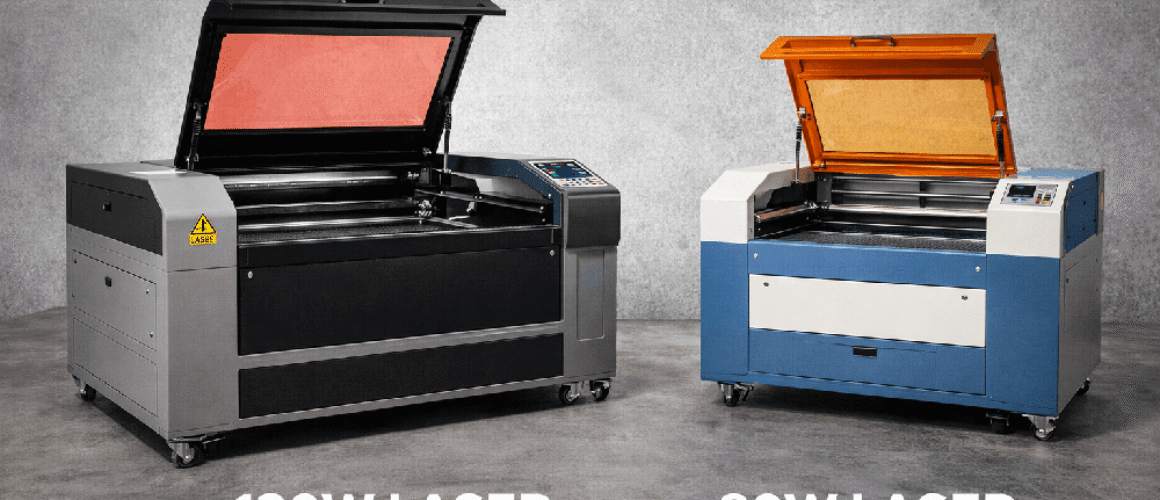
CO2 laser settings – comparison of 80W and 130W CO2 lasers.
Summary
The actual result of a CO2 laser primarily depends on how much energy is delivered to the material per unit length or area, rather than on a single setting. Power, speed, pulse frequency (Hz) or pulse density (PPI), focus, and air assist all influence each other, and manufacturers consistently emphasize that test runs must be performed on the exact batch of material before production.
In practice, an 80W CO2 laser is often considered a good balance for a wide range of tasks. It cuts common workshop materials effectively while also being suitable for detailed engraving and smaller jobs. A 130W CO2 laser, on the other hand, generally offers higher productivity: it can cut faster, handle thicker materials, or achieve results with fewer passes. This is especially noticeable with acrylic, MDF, and plywood, aligning with manufacturer guidance that higher power allows higher speeds for the same cutting depth.
It is important to understand that percentage power is not directly comparable between lasers of different мощности. A setting like 30% power does not produce the same absolute output on 80W and 130W machines. For example, 30% of 80W is about 24W, while 30% of 130W is about 39W, before accounting for tube efficiency or calibration. Manufacturers describe percentage power as a duty-cycle-like control and note variations between machines and wear over time.
The best workflow is to use a repeatable decision process: select the material, choose the appropriate lens and focus strategy, start with proven baseline settings, run a small test grid, and adjust one parameter at a time. Typically, speed is adjusted first, then power, then frequency or PPI, and finally focus. This approach aligns with both manufacturer guidelines and the so-called power grid method used in marking industries.
Scope, assumptions, and interpreting settings
This guide assumes a 10.6 µm CO2 laser, whether glass or RF tube, equipped with air assist and active exhaust. It also assumes common workshop materials such as wood, plastics, leather, rubber, coated metals, glass, and stone.
Controllers or software may use speed units in mm/s or mm/min, as is common in workflows like Ruida and LightBurn. Many manufacturer databases use percentage speed instead, which cannot be directly converted without knowing the machine’s maximum speed and motion characteristics.
Where numerical starting settings are provided, they are based on manufacturer parameter tables, manuals explaining power, speed, PPI, and Hz behavior, and safety and technical data sheets. Since machine model, optics, and beam quality are unspecified, all values should be treated as starting ranges and verified through testing.
Differences between 80W and 130W CO2 lasers and when to choose each
The most direct way to compare capabilities is to examine cutting speeds for the same material and thickness. For example, cutting 20 mm acrylic: an 80W machine achieves about 0.8 mm/s, while a 130W machine reaches about 2 mm/s—roughly 2.5× faster. For 2 mm plywood, the difference is also clear: about 80 mm/s for 80W versus 150 mm/s for 130W. In MDF, differences vary by thickness but increase with thicker materials.
For engraving, two practical limitations become more noticeable at higher power. First, the ignition threshold: higher power tubes often require higher minimum power, making very low-power engraving less stable. Second, fine detail depends on beam spot size and motion precision. Optical theory links spot size to wavelength, focal length, beam diameter, and quality.
An 80W laser is preferable for engraving-heavy work, thin materials, and general versatility. A 130W laser is better when productivity, thicker materials, and cutting speed are priorities.
How CO2 laser settings actually work
Percentage power represents output control, often via duty-cycle modulation. Approximate formula:
average optical power = rated power × percentage / 100.
Vector cutting depends on energy per unit length. Increasing power allows proportional speed increases. For example, going from 80W to 130W allows starting with ~1.63× higher speed (130/80).
Raster engraving depends on energy per area. Adjusting speed, power, DPI, or passes can achieve similar results.
Frequency (Hz), PPI, and edge quality
Higher frequency (e.g., 5000–20000 Hz) improves smooth acrylic edges. Lower frequency (~1000 Hz) keeps wood edges lighter. Higher PPI increases melting and burning; lower PPI reduces it but may roughen edges.
Focus and lens selection
Short focal length → smaller spot, higher density, less depth of field.
Long focal length → larger spot, more tolerance, better for thick materials.
Engraving starting settings (summary)
Typical starting points (mm/s, % power):
-
Birch plywood (3–6 mm): 80W → 18–28%, 500 mm/s; 130W → 12–20%, 500 mm/s
-
MDF 3 mm: 80W → ~28%; 130W → ~20%
-
Hardwoods: 80W → 20–30%; 130W → 15–25%
-
Cast acrylic: ~20% both
-
Extruded acrylic: 15–20%
-
Veneer: lower power
-
Leather: ~20%
-
Paper/cardboard: ~14–20%
-
Glass: 20–25%
-
Rubber: higher power
PVC and vinyl must never be laser processed. Bare metals are not suitable without marking compounds.
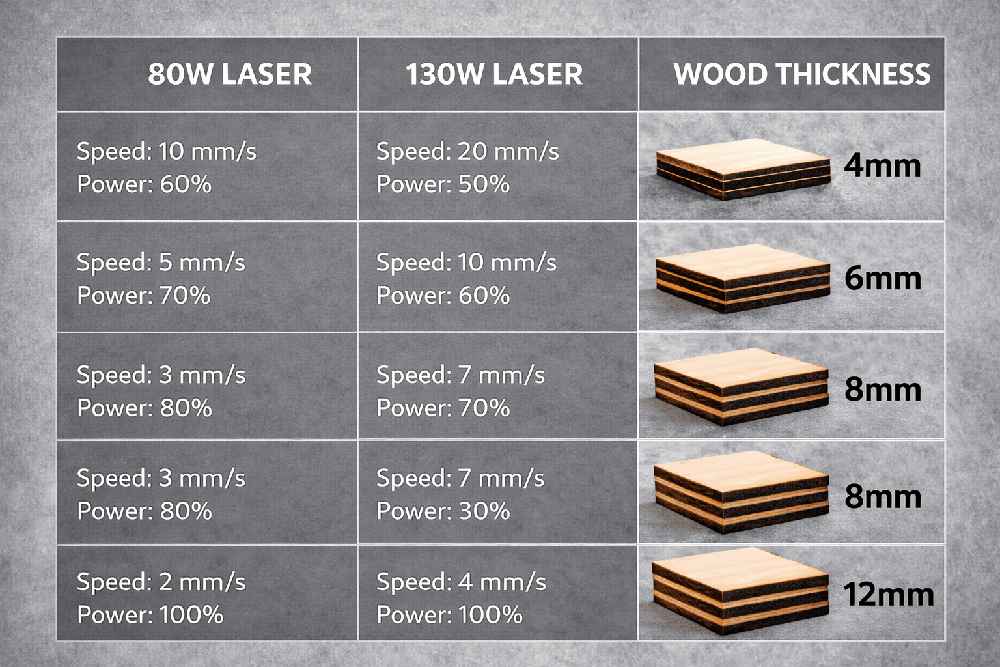
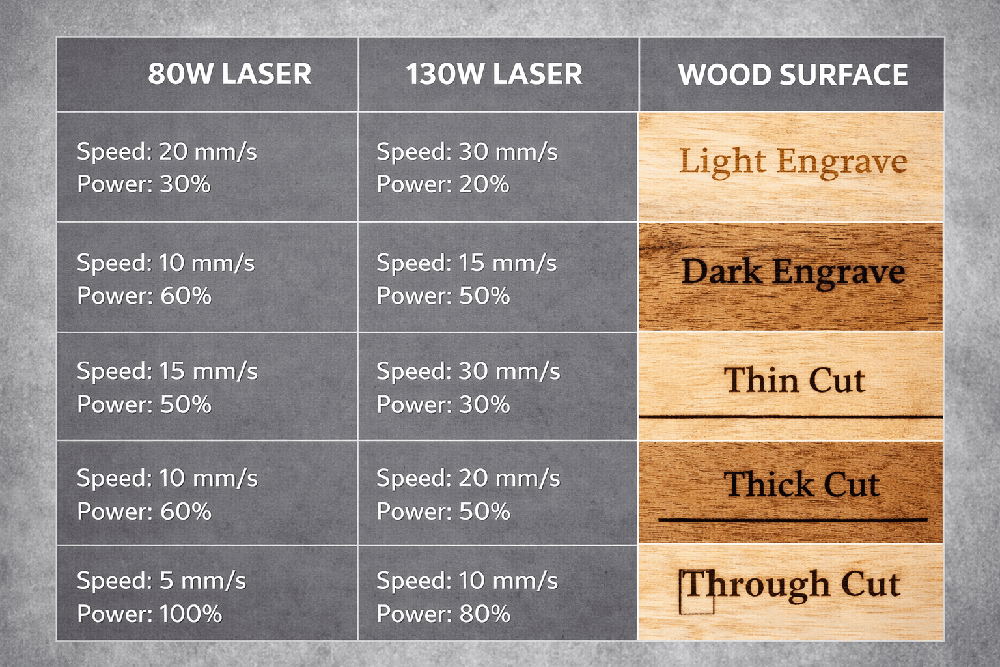
Initial Cutting Setup
The initial cutting values are also based mainly on Thunder’s 80W and 130W tables. The frequency guidelines follow manufacturer explanations: acrylic requires a higher frequency, wood a lower one, and textiles generally fall within the 1000–3000 Hz range. For cutting PET-G, guidance from the plastic manufacturer has been used, with industrial values adapted as an initial starting point.
For 3 mm birch plywood, a reasonable starting point on an 80W machine is about 90% power at 55 mm/s, while on a 130W machine it is about 80–90% power at 90 mm/s. For 4.5 mm plywood, the starting value for 80W would be about 90% and 35 mm/s, and for 130W about 90% and 45 mm/s. For 3 mm MDF, a suitable starting point on an 80W machine is approximately 90% and 30–38 mm/s, while on a 130W machine it is 90% and 28–40 mm/s. For 6 mm cast acrylic, about 90% and 10 mm/s is suitable for 80W, and about 90% and 12–14 mm/s for 130W; in both cases, a higher frequency should be used. For 10 mm acrylic, the starting point would be about 90% and 3.5 mm/s for 80W, and 90% and 5 mm/s for 130W. Thin veneer, leather, paper, cardboard, fabric, rubber, and cork all require separate testing, but as a general rule, a 130W machine can usually run the same job at a higher speed or with fewer passes.
Coated metals, such as anodized aluminum or powder-coated steel, are not materials for CO2 laser cutting; they are marked or engraved instead. Bare metals reflect the CO2 wavelength, so a fiber laser is generally more suitable for direct marking. PVC and vinyl are completely prohibited, and polycarbonate should be avoided unless there is very reliable information about its composition and safety.
Safety and Material-Specific Notes
Ventilation and smoke extraction are not optional extras; they are essential. Guidelines from the Massachusetts Institute of Technology emphasize that lasers must be equipped with adequate exhaust according to the manufacturer’s recommendations, and in many cases a specially designed system with sufficient static pressure is required. Simple room ventilation is not enough. Manufacturer and material safety data sheets also require adequate ventilation when laser-cutting plastics.
There are several materials that must be treated as strictly prohibited. PVC and vinyl must not be cut or engraved. Epilog Laser warns that PVC-related compounds can generate hydrogen chloride and vinyl chloride, which can irreversibly damage the machine and are hazardous to health. Trotec likewise lists PVC and halogen-containing materials as unsuitable because dangerous gases and dusts may be produced during processing. One manufacturer states this very directly: vinyl and PVC must never be cut.
Leather and synthetic leather require composition checks. According to Trotec, leather containing chromium(VI) compounds is unsuitable, and many synthetic leathers contain PVC. Recent scientific articles have also shown that laser-cutting certain types of tanned leather can generate hazardous chromium compounds.
MDF and some plywoods belong to the category of composite woods, where resin content and formaldehyde emissions must be taken into account. For that reason, these materials should be treated as heavily smoking materials that require strong extraction.
Post-Processing and Practical Notes
With acrylic, cast material engraves to a frosty white appearance, while extruded material usually cuts more smoothly. Removing the protective film after the job helps reduce smoke haze. For glass, heat-dissipation techniques such as a soap film can be used to reduce chipping and achieve a more even matte surface. With coated metals, it should be expected that the coating or anodized layer will be removed, and residues should be wiped off after processing. With marking compounds, a thin layer should be applied, allowed to dry, processed with the laser, and then the excess material should be washed away. PET-G may retain an odor after processing, so parts should be aired out and cleaned with warm water.
Troubleshooting, Maintenance, and Decision Process
If wood edges become very dark or charred, the speed should be increased, the power reduced, or the frequency lowered; for example, when cutting wood, moving toward about 1000 Hz can help. Using several faster passes instead of one slow pass may also help.
If the material does not cut through, especially in the case of plywood or MDF, the speed should be reduced slightly, the power increased, the focus checked, and proper air assist confirmed. It is also worth checking whether the material contains glue pockets or thickness variations. Multiple passes can help, but they often increase edge charring.
If the acrylic edge comes out rough or not glossy enough, the frequency should be increased, the suitability of the protective film checked, and the airflow and focus verified. For thicker material, a lens with a longer focal length may help reduce taper.
If plastic melts or welds back together, the frequency should be reduced or the speed increased, adequate air assist should be ensured, and if necessary multiple passes with cooling pauses should be used.
If flames or ignition occur, for example with paper, cork, or some types of wood, the airflow should be increased, the honeycomb table and debris tray cleaned, the laser dwell time on the material reduced, and the machine must never be left unattended.
Dirty optics can create the impression that the laser is weak. In reality, contamination of the optics reduces the power reaching the material and can damage the lenses. Manufacturers recommend cleaning the optics regularly, in some cases even daily. Misalignment and incorrect focus can also make it seem as though the settings are wrong, so these should always be checked during troubleshooting.
A practical way to transfer an 80W setting to a 130W machine is to start with the formula: speed on 130W equals speed on 80W multiplied by the ratio of 130 divided by 80. This gives about a 1.63× increase in speed. After that, the power can be reduced slightly if needed, and the frequency can be fine-tuned depending on whether the goal is a better acrylic edge or a lighter wood edge. This logic is based on the energy-per-length principle and is consistent with manufacturer notes that higher power allows higher speed for achieving the same cutting depth.